SDK PlayServ architecture & components
PlayServ is structured as a set of components grouped into four layers. Understanding this structure helps you find the right tool for each task — whether you are setting up a session, querying data, running server-side logic, or building a multiplayer room.
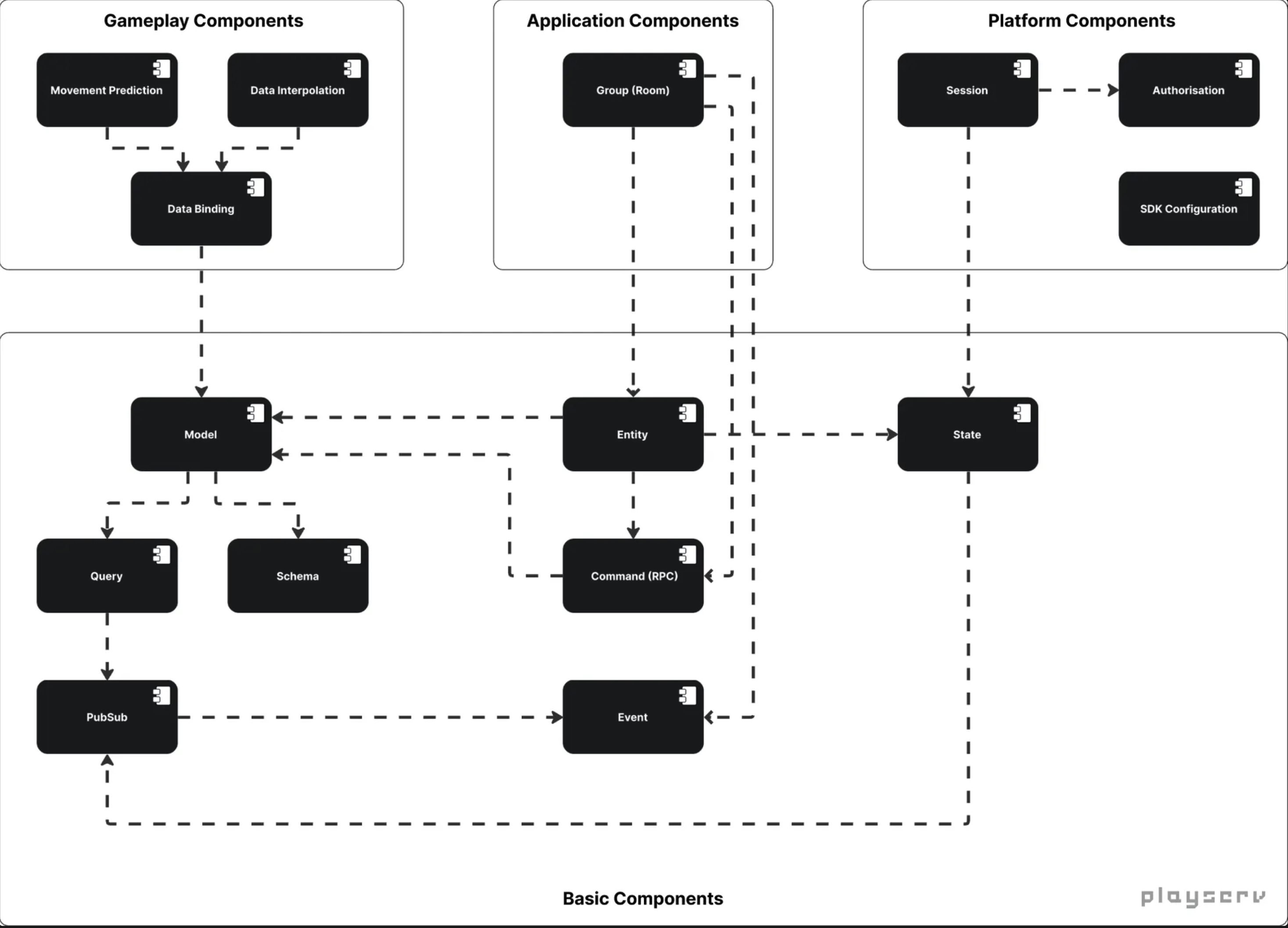
Four layers
The component map is organised top to bottom: higher layers depend on lower ones.
Basic Components form the foundation. Every other layer is built on top of them. This is where data access, querying, subscriptions, RPC commands, events, and session state live.
Platform Components define the runtime context. Session, authorisation, and SDK configuration sit here — they give the client its identity and operating state before gameplay can begin.
Application Components provide product-level features built on top of the foundation. Groups and rooms live at this level.
Gameplay Components are game-facing modules that consume data and state — typically the last layer before game code. They may apply patterns like interpolation and prediction.
Platform layer
Session
Session is the runtime context the client operates in. It holds the current state — Offline, Recovering, Active, or Banned — and drives how the client transitions through reconnect and active operation. Everything else in the SDK depends on having a session. To understand how the client moves between these states and what each one means for your game, read the Session Lifecycle & States guide.
Authorisation
Authorisation represents the privilege level of the current session. An unauthenticated session starts with minimal access. Passing a UserToken upgrades it, binding the session to a user profile and unlocking protected operations. How and when to pass that token is covered in User Login & Authentication.
SDK configuration
SDK configuration holds the credentials and settings that allow the runtime to identify the correct project and environment. If you have not set up your project credentials yet, SDK Initialisation & Handshake walks you through what each input is, where it comes from, and how to configure it in Unity.
Application layer
Group (Room)
Groups organise client connections and enable broadcast-style communication and presence tracking. A group sits above the basic layer and uses it for signalling and server-side behaviour — including extendable join and leave flows. How groups are created, joined, and extended with custom server-side rules is covered in the Groups guide.
Basic layer
Model, Query & Schema
Model is the entry point into game data operations. It connects client code to querying, filtering, mutations, and subscriptions. Query handles the construction and filtering of data requests. Schema defines the data structure and relationships between objects — it is what makes nested retrieval and automatic relation expansion possible. The full query syntax is described in Query Language & Data Retrieval.
PubSub
PubSub is the subscription mechanism that drives live updates. When server-side data changes, deltas are delivered to subscribed clients immediately. The first delivery is a full snapshot; subsequent updates are JSONPatch deltas applied automatically. If you want to keep a local copy of server data in sync without polling, Data Subscriptions & Live Updates explains how.
Entity
Entity provides an entity-centric view of data and behaviour. It sits between data access and commands, and is what makes it possible to attach domain behaviour — like player.Shoot() — as named RPC methods on a model type. How to persist field changes and extend models with custom methods is covered in Data Mutation & Model Extending.
Command (RPC)
Command is the mechanism for executing named server-side operations. Server code is authored in the client codebase, discovered by the code analyser, and deployed to the server runtime. Client code calls it via PlayServ.Remote(...). The full execution model is described in RPC & Server-side Game Logic.
Event
Event is the typed signalling mechanism shared by both sides. An event is declared with [Event], sent via Send(...) or generated sugar, and received via Wait<T>(...). The same contract is available on client and server through automatic generation of event description classes. For the full API see the Events System guide.
State
State is the underlying state layer used by runtime features. Session state transitions — Offline → Recovering → Active — are the most visible use of it, but it underpins other SDK components as well. The states and how to subscribe to them are described in Session Lifecycle & States.
Connection path
The component map describes logical components. The physical entry point — how the client actually connects to PlayServ — is handled separately by the Proxy and the handshake flow. This is where tokens are validated, connection policy is enforced, and ClientReady is emitted before gameplay systems can safely start. If you want to understand what happens between calling PlayServ.Ready(...) and the session reaching Active, the Proxy Module & Handshake guide covers that flow in detail.
Next step
Start with SDK Initialisation & Handshake to set up your project credentials and get the SDK running, then follow the reading order below: